SAPIUSAI PLC
ITENESDEFR
Free 7-day trial

A colleague for your automation work

Your AI colleague for PLCs and HMIs.
Writes, compiles, fixes.

From project documents to PLC programs and HMI screens. Sapius reasons with you, uses project tools and keeps decisions, sources and checks together. In TIA it writes, imports into a copy, compiles and fixes; for other environments it prepares and works with dedicated formats.

Connect your supported AI account or your own API. A paid Sapius subscription also includes €10 of AI balance each month. Manufacturer tools require their software and licences on your workstation.

  • SCL written, imported and compiled in your TIA
  • 7 days free trial, you start it yourself
  • V16–V20 TIA Portal with Openness, from V16 to V20
SAPIUS · example — Line 1
you › FB for the two conveyors, run permissive from N01. Import and compile.
▸ searching the sources  “N01 permissive”
3 hits  segnali.xlsx row 212 · manuale.pdf p.14
▸ writing FB120_Nastri.scl
▸ importing into TIA  [SCRITTURA NEL PROGETTO TIA] [s/N] s
▸ compiling  CPU_Linea1
2 errors  line 41 undefined tag · line 58 wrong data type
▸ fixing lines 41 and 58, re-importing  [s/N] s
▸ compiling  CPU_Linea1
■ 0 errors  FB120_Nastri compiled
WAITING FOR YOUR YES
FB120_Nastri → TIA project
import the block?

Sapius at work

From your request to a TIA project.

Ten motors with PID: watch Sapius analyse the project, create the blocks and check them in TIA Portal.

Music: «Inspired» — Kevin MacLeod (incompetech.com), CC BY 4.0. Excerpt with adjusted volume and fades.

Why Sapius

It does the repetitive work. The decisions stay yours.

One workspace to read project documents, develop the program and prepare the operator interface. Project context stays with your conversations, files and checks.

Writes, compiles, fixes

Describe the block the way you would to a colleague. It writes the SCL, imports it into the project and compiles. If TIA reports errors, it reads them, fixes them and compiles again. What’s left for you is the review.

  • FBs and FCs in SCL, imported as an external source
  • Reads compiler errors with line and message
  • Brings you the compiled block, ready for review

Thinks it through with you, and remembers

A workmate, not a code vending machine. It searches the manuals and signal lists, asks you for what’s missing instead of making it up, and talks through with you how to set up the work. What you decide together stays written in the job.

  • Reads text-based PDFs, Word, Excel and the job’s source files
  • What it can’t find in the sources, it asks you
  • Next day, you pick up where you left off

You decide. Always.

Choose how to collaborate: individual confirmations or Everything mode to continue on TIA copies without stopping at every import. Sapius prepares copies and archives before changes. You remain in charge of commissioning.

  • Work mode chosen for each project
  • TIA dialogs get No or Cancel, never “yes to all”
  • Before writing, it archives the project and saves a copy of the block

How it works

From the job folder to the compiled block

The same steps you take, minus the repetitive part. You stay in command.

  1. 01

    Give it the job

    Point it to the folder with manuals, signal lists and project exports. Sapius copies the files into the job and reads them. Then you tell it what you need.

    When it uses your documents, it cites file, page and line: you know where it comes from.

    Sapius · example
    you › When can conveyor N02 start?
    ▸ searching the sources  “N02 permissive”
      segnali.xlsx  sheet IO row 212  N02_Consenso
      manuale.pdf   p.14  “N02 starts only with N01 running”
    ▸ N02 starts with N01 running and the permissive present.
      missing data  the delay between N01 and N02 is not in the sources. How many seconds?
  2. 02

    Writes the block and brings it into TIA

    It connects to the TIA Portal you already have open. It writes the SCL, imports it and compiles. If there are errors, it reads them, fixes them and compiles again, working down to zero errors.

    It works on a copy of the project, in the folder you choose: the original stays where it is. Bringing the block into the real project is up to you, when you’re happy with it.

    Sapius · example
    you › FB for the two conveyors, run permissive from N01. Import and compile.
    ▸ searching the sources  “N01 permissive”
    3 hits  segnali.xlsx row 212 · manuale.pdf p.14
    ▸ writing FB120_Nastri.scl
    ▸ importing into TIA  [SCRITTURA NEL PROGETTO TIA] [s/N] s
    ▸ compiling  CPU_Linea1
    2 errors  line 41 undefined tag · line 58 wrong data type
    ▸ fixing lines 41 and 58, re-importing  [s/N] s
    ▸ compiling  CPU_Linea1
    ■ 0 errors  FB120_Nastri compiled
  3. 03

    You choose when it asks

    In Manual mode you confirm the steps. In Everything mode your consent covers imports into the TIA copy: Sapius continues with blocks, DBs and calls, compiling and fixing without asking the same question again.

    Changes follow an archive. Copies, parameters and results remain recorded in the project; the real PLC stays under your control.

    Sapius · example
    [SCRITTURA NEL PROGETTO TIA]
    block      FB120_Nastri
    project    Linea1_copia · CPU_Linea1
    before     archive the project, copy the block
    
    import the block?  [s/N]

In your TIA Portal

An engineering workbench for TIA Portal

It connects to the TIA session you already have open and takes the same route you would take from the menu. When it’s done, it tells you what it did and where the archive and the block copy are.

  • Analyses CPUs, hardware, channels, blocks, tags and program relationships
  • Develops FBs, FCs, new DBs and UDTs; integrates program calls in the copy
  • Compiles and gives you errors and warnings, errors first
  • Prepares classic WinCC screens and tags, and PLCSIM Advanced tests

Keep control of the work

  1. Downloads nothing to the CPU: you do that from TIA, as you do today
  2. Sources, copies and build results stay in your project
  3. Doesn’t touch know-how protected blocks
  4. The F-program and the safety logic stay with you
  5. From the CPU it only reads: no values written, no commands to the plant

PLC · HMI · communication

More brands. One project workspace and method.

Choose PLC family and protocol separately. Sapius uses the right formats and tools, from source code to operator interface. IDE import and compilation require the manufacturer’s software and licences.

Siemens · TIA Portal

Blocks, new DBs and UDTs, calls, hardware, classic WinCC and PLCSIM Advanced tests.

Rockwell · Logix

L5X analysis and generation, ST routines, tags and data types. Changes in new exports for your Studio 5000 workflow.

CODESYS · Schneider

ST sources, export analysis and native visualizations. Import and compilation through ScriptEngine; XML exchange for Control Expert.

Beckhoff · TwinCAT

Read TwinCAT projects, edit POUs in a copy and build locally with XAE installed.

Optix · Weintek

Design-time NetLogic for FactoryTalk Optix; CSV tags and macros for EasyBuilder Pro. Reusable material for your HMI project.

S7 · Modbus · OPC UA · EtherNet/IP

S7, Modbus TCP, OPC UA and EtherNet/IP: dedicated settings, explicit connection tests and timestamped reads with quality.

Operion · the shop-floor runtime

On the shop floor you don’t need a chat. You need it to work.

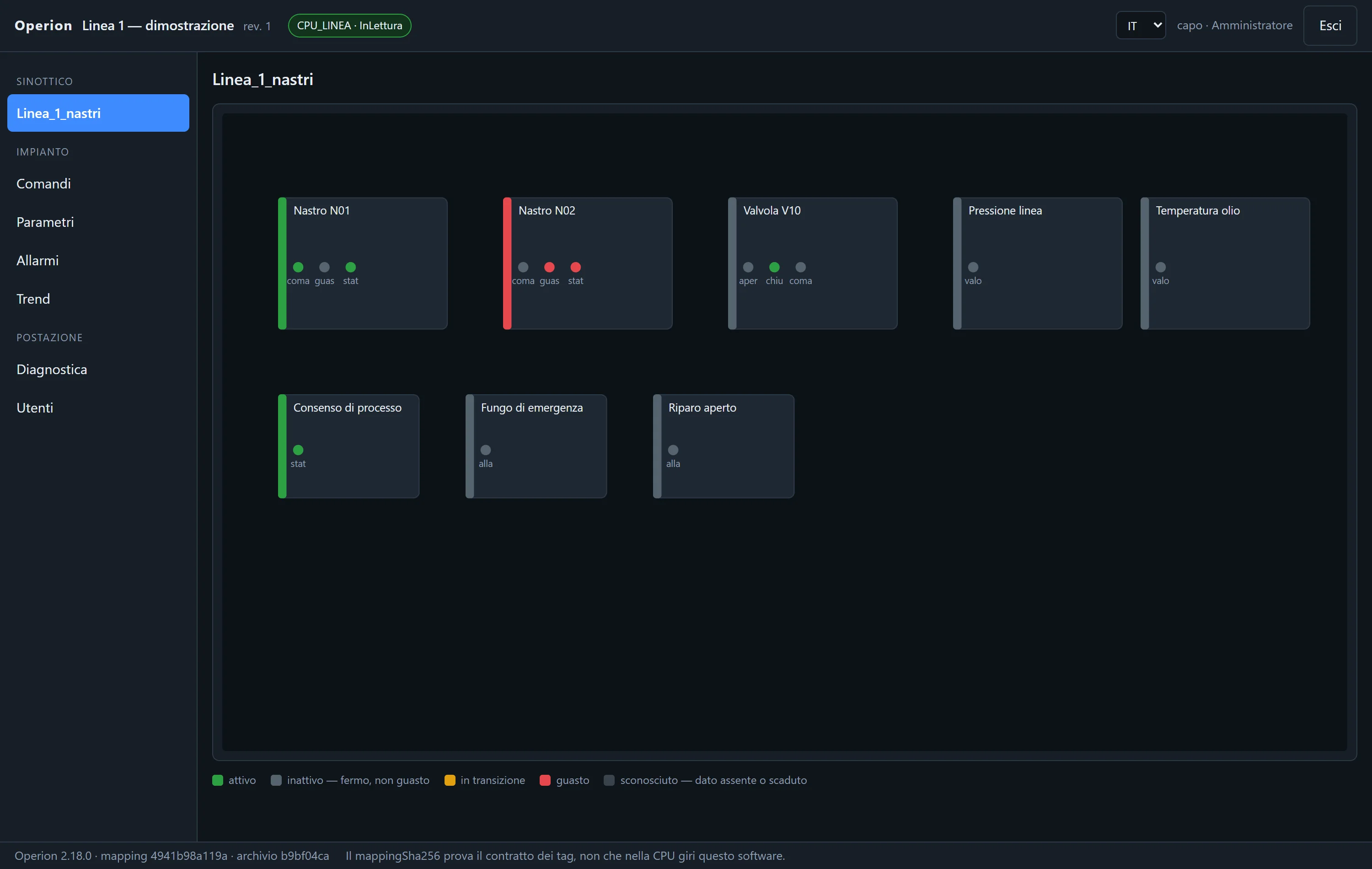
Operion opens the package of screens, tags and commands prepared in Sapius. It communicates through S7, Modbus TCP, OPC UA and EtherNet/IP and shows the shop-floor overview. It runs independently, without Sapius, AI or Internet.

Operion — HMI

Screenshots of Operion on a demo line.

Stopped is not faulted

Five states: active, stopped, in transition, fault, unknown. Fault overrides everything, and data that isn’t arriving never turns green.

Each PC runs on its own

Each workstation has its own Operion. If one goes down, the others carry on: no central server to maintain.

Local users and roles

Viewer, operator, maintainer, administrator. No factory-default password: you create the first administrator yourself.

Who sent which command

Every command is logged before it goes out: who, when, which tag, which value. Then it tells you how far it got: written, acknowledged and, if the command declares it, the feedback from the field.

Free trial

Seven days to watch it work on your project

Bring your sources and a copy of your project. One week to discover how much work Sapius saves in your engineering environment.

01

Create your account

Sign up as an individual or a business. Complete your billing details, accept the terms and confirm with the emailed code. Individuals do not need a VAT number.

02

Install and start the trial

Install Sapius on your engineering PC: the agent engine is included. Sign in and activate the 7-day trial, with Officina.

03

Choose your AI and get started

Connect a supported account or compatible API, open a project copy and request your first task. AI preferences apply to new conversations.

Download Sapius

Seven days on one project, including Officina: one trial per account and PC, with no automatic charge. Use your own account or API. The monthly €10 AI allowance starts with a paid subscription. Your projects stay on your PC.

Pricing

Sapius, AI and
pay-as-you-go top-ups.

Sapius: one complete subscription per workstation, with €10 of AI balance every month, including annual plans. Your own account or API does not use this balance. Operion is paid once per workstation. VAT excluded.

subscription + AI balance

Sapius

€79 per month, per workstation

Individuals in Italy: €96.38/month including VAT; list price €206.18. Business prices exclude VAT.

Launch price until 31 March 2027; from 1 April 2027 list price €169 a month. Subscribe by 31 March and you keep it for 12 months from your first activation.

Yearly: €790 per workstation. Launch price until 31 March 2027; from 1 April 2027 list price €1,690.

It renews automatically. Cancel whenever you like from your account area: it stays active until the end of the paid period.

Your automation workbench: documents, PLC programming, HMI tools, synoptics and Operion packages in the same project.

  • Writes, imports and compiles SCL in TIA Portal
  • All available integrations, without brand-specific packages
  • Synoptic editor and packages for Operion
  • Updates and €10 AI balance per month and paid workstation
optional top-ups

Pay-as-you-go AI

20 €50 €100 €

Individuals in Italy: €96.38/month including VAT; list price €206.18. Business prices exclude VAT.

Each paid Sapius workstation includes €10 of AI balance monthly, also on annual plans. The monthly allowance does not roll over. Alternatively, connect your supported account, own API or compatible local model: the Sapius tools remain the same.

Optional €20, €50 and €100 top-ups, excluding VAT. Model rates: provider cost in euros + 50%. See AI and balance in your account for rates and availability. No automatic model switching or top-ups. (IT, IVA/VAT/TVA/MwSt. 22%: 24,40 € / 61,00 € / 122,00 €)

one-off

Operion

€499 one workstation, perpetual licence

Individuals in Italy: €608.78 including VAT; from 1 April 2027 list price €1,207.80. Businesses: €499 + VAT, then €990 + VAT.

In packs, launch price until 31 March 2027: 3 workstations €999, 5 workstations €1,499. From 1 April 2027 list price €2,490 and €3,750. More than 5 workstations, on request.

The shop-floor runtime: synoptic, commands, alarms and recent trend on the plant PC.

  • Runs without Sapius, without TIA and without Internet
  • Local users and roles, a log of every command
  • S7, Modbus TCP, OPC UA and EtherNet/IP drivers
  • No recurring fee: the licence never expires. Updates for 24 months if you buy at the launch price (12 at list price), then, if you want, maintenance at €198 a year per workstation

The Operion family

From the panel to remote assistance

The same Operion wherever you need it: on the machine panel, on a Raspberry for remote assistance, on the technician’s PC, on Linux.

Operion touch

€29 per panel, one-off

VAT excluded. Launch price until 31 March 2027; from 1 April 2027 list price €59. Included with JIT panels.

The runtime for panels up to 10 inches: one PLC and a thousand tags, full-screen synoptic. Perpetual licence.

Remote-assistance box

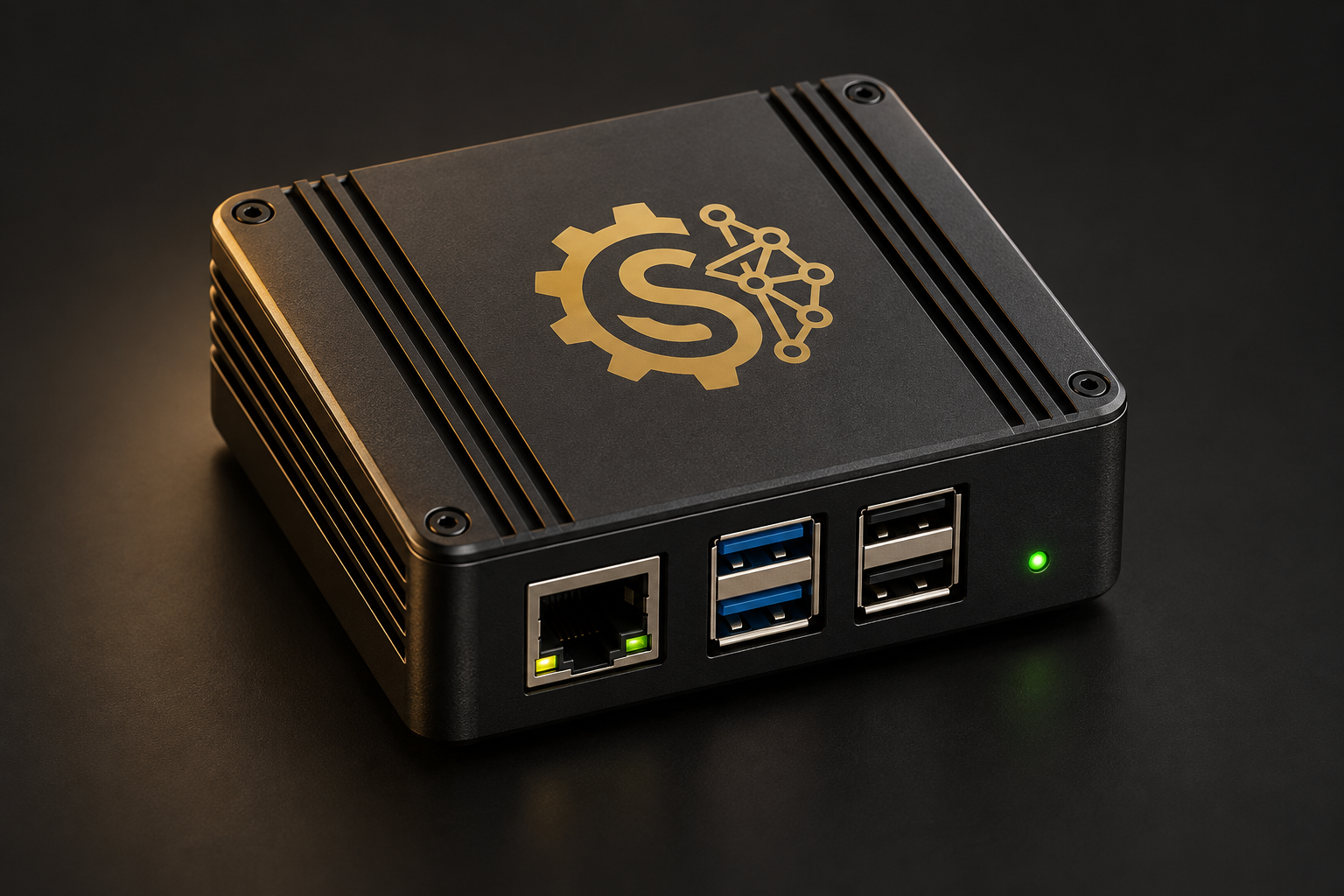
Box Raspberry Pi con simbolo Sapius

€49 a year per box, single price

VAT excluded. It renews automatically and you can cancel whenever you like. You choose the Raspberry Pi; with the licence you get the ready image with Operion.

A Raspberry Pi on the shop floor, on the PLC network. The technician reaches it remotely with Operion Client: encrypted, outbound connection, no port to open.

Operion Client

Included for the technician, on Windows

Not charged separately: download it from your account area and sign in with your account.

The technician’s program. With the code the Operion administrator reads out, or with a paired workstation, the technician reaches from their own PC the PLCs and ports the plant opens to them, over an encrypted connection.

Operion on Linux

Same licences x64 PCs and 64-bit Raspberry Pi

The per-workstation licence is the same as on Windows. Download it from your account area.

Operion also runs on Linux: on the shop-floor PC, on the panel, on the box. Same package, same synoptic.

Requirements

What you need

Just a few things, and your engineering office already has most of them. The installer brings the rest.

In the engineering office

  • Windows 10 · 1164-bit
  • TIA Portal V16 – V20for the Siemens workflow: Openness and a Windows user in the Siemens TIA Openness group. Other families use their own engineering software
  • AIa supported account, your compatible API or Sapius AI; choose in settings. Manufacturer software and licences remain separate
  • Agent engineincluded in the Sapius installer
  • PDF · DOCX · XLSXthe job documents: PDF, Word, Excel and source files

Works in a virtual machine too.

In the field and on the shop floor

  • Siemens S7-1200 · S7-1500for S7 reads: standard-access DBs and PUT/GET enabled. Other protocols have their own connection settings
  • Operionon a Windows or Linux PC, on a Raspberry Pi or on a panel up to 10 inches. No Internet, no AI

Your engineering environment

  • Multiple PLC and HMI manufacturersChoose the project family and installed software; see supported formats and tools above
  • Modbus TCP · OPC UA · EtherNet/IPconfigured separately from the brand, in Sapius and Operion

Installation

Two installers, and you’re ready

One Sapius installer for the engineering PC, including its engine and components. One Operion installer for the shop-floor PC. Choose your AI connection and project family, then start with your project.

  • Silent install, for rolling it out to several PCs
  • Sapius tells you about updates and you install when it suits you; Operion you update with the new installer
  • If you uninstall, your data stays where it is

SAPIUS · ENGINEERING OFFICE

OPERION · SHOP FLOOR

Questions

The answers, before you try it

Does it touch my PLC?

Sapius develops and checks work on project copies. Downloads and operations on a real PLC remain yours. Reads use the connection configured in your project. Everything mode continues imports into the TIA copy under your chosen consent; you can change mode at any time.

How does the block get into the real project?

Sapius works on a copy of the project, in the folder you choose. You bring the block into the real project yourself, as you would with a colleague’s: copy it in TIA from one project to the other, or import its SCL source, which stays among the job files. Or you carry on working on the copy.

Does it write LAD and FBD too?

In TIA it develops FBs and FCs in SCL, creates new DBs and UDTs and integrates program calls. It can work with XML exports, including existing networks, preserving their content and checking the result with the TIA compiler.

Can it rewrite OB1 or the safety part?

It can integrate calls in Main on the working copy and check compilation. Everything mode includes these edits. The F program and safety logic remain the designer’s responsibility.

Can I use the code it writes as it is?

Sapius keeps the source and verification results. In the TIA workflow it imports and compiles on a copy; other formats are checked in the manufacturer software available on your PC. Review, testing and commissioning remain yours.

Does it work with my TIA version?

Sapius works with TIA Portal from V16 to V20, with Openness: choose your version and go.

Which PLCs and panels can I work with?

Alongside TIA Portal, tools cover Rockwell L5X files, CODESYS and Machine Expert, Control Expert exchange files and TwinCAT projects. For HMIs: classic WinCC in TIA, CODESYS visualizations, Optix NetLogic and Weintek tags and macros. Import and compilation require compatible manufacturer software; the manual explains each family’s workflow.

My TIA runs in a virtual machine. Is that OK?

Yes. Sapius installs wherever TIA is, in a virtual machine too, and the licence activates there.

Which model does it use?

Choose a supported ChatGPT account, compatible API or Sapius AI in settings. The catalogue lists available models and rates; local endpoints require tool compatibility. New conversations use your choice; existing ones keep their original profile.

Where does my data go?

Your archive stays on your PC. With your own account or API, required content goes to your selected provider; Sapius AI routes it through the Sapius gateway to the listed provider. Optional shared knowledge is separate: only reviewed general technical notes, never automatic publication of project data.

What about documents under NDA?

Choose the documents and check your client agreements. Required content is processed through the selected AI connection. Sapius AI is covered by the privacy notice and Annex A of the terms; your own account or API is also governed by your provider agreement.

How much does it cost?

Sapius: €79 a month per workstation, or €790 a year. That is the launch price until 31 March 2027, and if you subscribe by then you keep it for 12 months; from 1 April 2027 list price €169 a month or €1,690 a year. Operion, paid once: €499 for one workstation, €999 for three, €1,499 for five, launch price until 31 March 2027; from 1 April 2027 list price €990, €2,490 and €3,750. Operion touch €29 (from 1 April 2027 list price €59), included with JIT panels. Remote-assistance box €49 a year. VAT excluded. And before all that, a free seven-day trial. Updates and €10 AI balance per month and paid workstation. Optional AI top-ups of €20, €50 and €100 excluding VAT, from AI and balance.

What happens after the seven days?

No automatic charge. We email you the day before. The trial licence expires, and the Officina module with it. To carry on, you subscribe. Projects, conversations and sources stay on your PC.

How do I subscribe?

In the customer portal, create your business account, complete billing details and accept the terms using the email code. On Purchases, choose a licence and complete payment through Stripe. After payment confirmation, the licence is available in your portal. Activate the trial directly there.

Does it work without Internet?

Operion supervision runs locally without AI. Remote assistance, Box licence renewal and other remote services need a connection. Sapius needs the network for the model and your account.

Can I see it live first?

Yes. Write to us through the form: we’ll show it to you remotely, on an example close to your plant.

Talk to us

Tell us about your project

Tell us about the plant, PLC and panel brands, and the software you use. Activate your free trial directly in the portal.

  • You get a PLC programmer, not a call centre
  • Live remote demo, on request
  • Quote for shop-floor Operion licences

Prefer to write from your own email? The address is support@sapiusportal.it

How we handle your data: privacy notice (Italian)

Manual

Everything you need to use it well

Installation, projects, PLCs and protocols, TIA and other environments, HMIs, message queue, shared knowledge, Operion and the portal. Step by step.

You stay in command.
Sapius does the repetitive work.

Sapius was born at JIT Engineering, built by a PLC programmer who works on industrial plants. On a real job, with an AI agent and his own way of working in TIA, he finished in two days work that, by his own estimate, would have taken twenty. Sapius is that method, built into a program.

← Torna al sito

Area riservata Sapius

Licenze

crediti
—

Ricarica

    Movimenti

      Fatture

        Dati di fatturazione

        Conoscenza condivisa

        Soluzioni tecniche revisionate, con prodotto, versione e verifica. Ogni esperienza utile può aiutare il prossimo lavoro.

        Condividi una soluzione

        Scrivi una procedura generale che hai provato. Controlla il testo ed elimina nomi di clienti, indirizzi, percorsi e dati dell’impianto. Il contributo viene revisionato prima della pubblicazione.

        I tuoi contributi

        Revisione della conoscenza

        Controlla riservatezza, applicabilità e risultato dichiarato. La verifica del contributore non è una prova eseguita dal portale. Le segnalazioni degli altri utenti restano visibili.